Big-O Notation Without the Anxiety
A calm, practical tour of Big-O: the few complexity classes you actually meet, JavaScript examples, a Set optimisation, and when to just measure.
On this page
Big-O has a reputation as interview trivia, but the idea is small and useful. You do not need the maths; you need a feel for how code slows down as data grows.
What Big-O answers
Big-O describes how the amount of work grows as the input grows. It does not tell you how many milliseconds something takes. It tells you what happens when n goes from a thousand to a million.
The classes you actually meet
Five cover almost everything in day-to-day web code.
O(1) and O(log n)
Constant time means the work does not depend on input size. Reading an array index is the typical example.
const firstItem = items[0];Logarithmic time means each step discards half the remaining data. Binary search on a sorted array is the standard case.
function binarySearch(sorted, target) { let lo = 0; let hi = sorted.length - 1; while (lo <= hi) { const mid = Math.floor((lo + hi) / 2); if (sorted[mid] === target) return mid; if (sorted[mid] < target) lo = mid + 1; else hi = mid - 1; } return -1;}A million items need only about twenty steps.
O(n), O(n log n) and O(n^2)
Linear time touches each item once. find is O(n) in the worst case, because it may scan the whole array.
const user = users.find((u) => u.id === id);Good general-purpose sorting is O(n log n), which is what Array.prototype.sort gives you in practice.
const sorted = [...numbers].sort((a, b) => a - b);Quadratic time usually means a loop inside a loop over the same data.
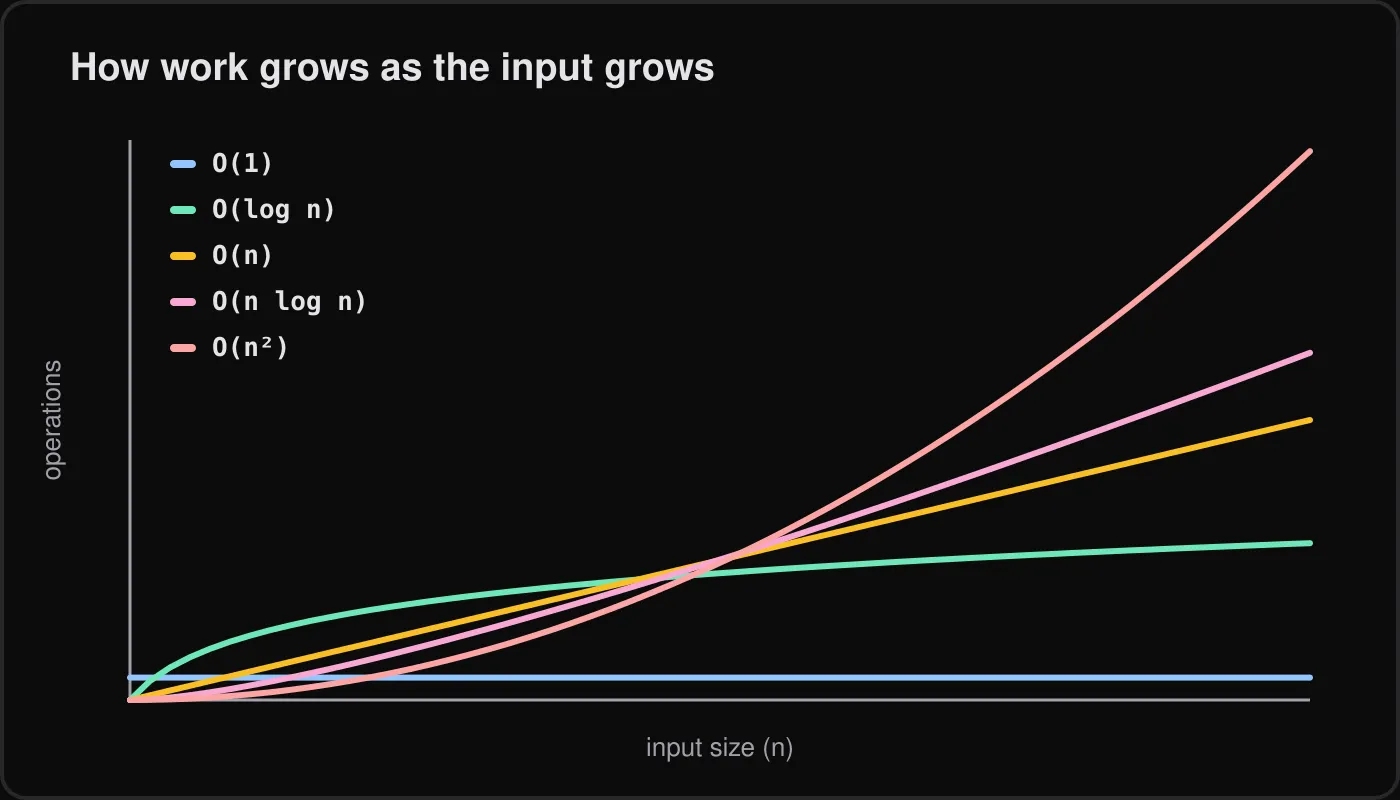
for (let i = 0; i < items.length; i++) { for (let j = i + 1; j < items.length; j++) { if (items[i] === items[j]) console.log("duplicate", items[i]); }}As n grows, the curves diverge dramatically, and the quadratic one is the one that eventually hurts.
Dropping constants and lower terms
If a function does 3n + 10 operations, we call it O(n). Constants and smaller terms stop mattering as n grows, so Big-O keeps only the dominant one. Two sequential loops are still O(n), while a loop nested in a loop is O(n^2).
A practical fix: includes versus Set
This is the most common real-world win I see. Calling includes inside a loop scans an array each time.
// O(n^2): includes scans b for every item in afunction commonSlow(a, b) {  return a.filter((x) => b.includes(x));}
// O(n): building the Set is linear, each has() is constant on averagefunction common(a, b) {  const lookup = new Set(b);  return a.filter((x) => lookup.has(x));}
The trade is a bit of extra memory for a much faster lookup.
For small n, measure
Big-O ignores constants, and for small inputs constants dominate. A simple array scan over 20 items can beat a Set because of lower overhead. Before optimising, measure with realistic data.
const a = Array.from({ length: 20000 }, (_, i) => i);const b = Array.from({ length: 20000 }, (_, i) => i * 2);
console.time("includes");commonSlow(a, b);console.timeEnd("includes");
console.time("set");common(a, b);console.timeEnd("set");
performance.now() works too if you want the numbers in code. Measuring instead of guessing is also the heart of habits for debugging faster.
Space complexity in a paragraph
Space complexity asks the same question about memory. commonSlow uses O(1) extra space apart from its result, while common uses O(n) for the Set. Faster code often costs memory, so it is worth knowing which resource is scarcer in your situation.
What to do next
Pick a hot path in your own code, such as a loop that calls includes, indexOf or find, and ask what happens at ten times the data. If the answer is “much worse”, try a Set or Map, then measure before and after.